PDF to Jpeg/Jpg/Tiff/Bmps converter Publisher Review:
Convert Adobe PDF to Jpeg/Jpg/Tiff/Bmp/Eps/Ps, acrobat to Image batch converter, conversion.
PDF to Image(Jpeg/Jpg/Tiff/Bmp/Eps/Ps) Converter V4.0 is a batch image converter that convert PDF documents to image(Jpeg/Jpg/Tiff/Bmp/ Eps/Ps). It is the fast, affordable way to convert a lot of adobe PDF files to popular image format once time for saving your time! Its easy-to-use interface allows you to create Image files from PDF documents by simply few clicks. It supports batch converter mode. Creating documents which can be viewed on any computer with a Image viewer.
PDF to Image(Jpeg/Jpg/Tiff/Bmp/Eps/Ps) Converter V4.0 lets you instantly convert Adobe PDF acrobat documents into fully-formatted and professional-quality Jpeg/Jpg/Tiff/Bmp/Eps/Ps file format.
Using PDF to Image(Jpeg/Jpg/Tiff/Bmp/Eps/Ps) Converter
Step 1: Add the Adobe PDF documents to the file list.
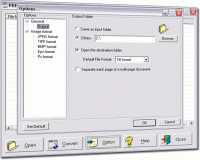
Step 2: Chick "Options" button in the toolbar to open Setting dialog.
From here, you merely need to change the entries in the GUI to suit your needs, and the Image File will be produced according to your specifications.
Step 3: Chick "Convert " button to convert the documents to Image.
It supports conversion into High colors (24 bit)/Greyscale (8 bit) Jpeg/Jpg Format.
It supports conversion into Multi page High colors (24 bit) TIFF Format.
It supports conversion into Multi page Middle Color (12 Bit) TIFF Format.
It supports conversion into Multi-page 2 colors (Black/White) TIFF Format.
It supports conversion into True Color (32 bit) BMP Format.
It supports conversion into Level 1/1.5/2 EPS Format.
It supports conversion into Level 1/1.5/2 PS(postscript) Format.
It supports batch convert mode.
It supports separate each page of a mutli-page document:
When you want images of each page of a multi-page document. You can separate each page of output in a series of similarly named files. Whats new in version 2.0: PDF to Jpeg/Jpg/Tiff/Bmps converter Requirements: Windows 9x/Me/NT/2k/XP Operating system: Win95,Win98,WinME,WinNT 4.x,Windows2000,WinXP,Windows2003 Release notes: New Release
Aiseesoft PDF to Image Converter is the professional PDF to Image Converter program to convert PDF file to lots of image file for you to choose with high quality, such as convert PDF to JPG, PDF to GIF, PDF to TIFF, PNG, BMP, PCX, TGA and so on.
Price: $25, Rating: 6, Downloads: 131 Download
Aiseesoft DVD to AMV Converter is the most professional and easy-to-use DVD to AMV conversion software. With a few mouse clicks, you can quickly and easily convert DVD to AMV file.
Price: $25, Rating: 6, Downloads: 113 Download
Batch PSD to JPG is a free batch Photoshop PSD image to JPG image converter. A simple and handy design tool for converting your psd design or flatten multi layer psd design to JPG images.
Price: $0, Rating: 10, Downloads: 101 Download

 PDF to Jpeg/Jpg/Tiff/Bmps converter 2.0 details